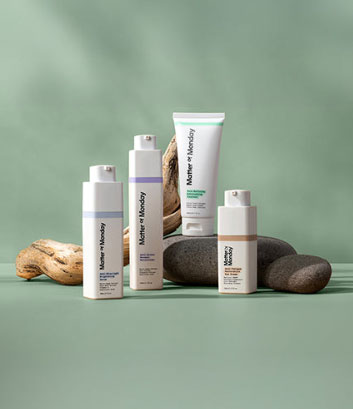


How to Look Better on Zoom? 8 Tips for Camera-Ready Skin
Key Highlights Camera angle, lighting, and background can affect how your skin and features appear on Zoom. Long video calls can leave you looking dull, dry, puffy, or tired on camera. Simple skincare habits can help keep skin clean, hydrated, and comfortable throughout screen-heavy days. Lightweight skincare and makeup layers can help prevent texture from showing under webcam lighting. A consistent routine can include cleansing, targeted serum, moisturizer, eye care, and broad-spectrum SPF. Matter of Monday creates clean, fragrance-free skincare designed for screen-heavy lifestyles and sensitive skin. You've adjusted the lighting. You've propped the laptop up on a stack of books so the camera hits eye level. You've even blurred the background. And you still catch your own reflection in the corner of the screen and think, I look tired. That's because most Zoom advice stops at staging. Search how to look good on Zoom, and you'll get the same handful of tips everywhere: camera angle, lighting, background, repeated across dozens of guides. Camera angle and lighting can hide a lot, but they can't fix dull, puffy, or stressed-looking skin; they can only put better light on it. If you're spending six hours a day in back-to-back calls, your skin is dealing with something no ring light can undo. This piece covers the part most guides skip: what screen time is actually doing to your skin, and what helps beyond adjusting your camera settings. What's Actually Happening to Your Skin on Camera? Part of the difference is genuinely technical. Webcams flatten and slightly distort your features. Bad lighting casts shadows that make skin look uneven. Video-call compression can wash out color and detail. That's all real, and it's why the usual lighting and angle advice exists in the first place. But there's a second layer that advice never touches. Skin behaves differently after hours of screen exposure, and it's not your imagination that you look more tired by your fourth call than you did in the mirror that morning. We call this Zoom fatigue skin: the specific combination of dullness, puffiness, and stressed-looking texture that builds up over a screen-heavy day. It's not the same as being tired. It's a physical response to your actual environment. A few specific things are driving it at once: Blue light exposure adds up. Screens emit blue light, and while it's less intense than direct sunlight, hours of daily exposure create oxidative stress that damages skin cells over time. That oxidative stress is a potential concern. Research found that blue light could produce oxidative stress in live skin, and the study suggests it may contribute to skin aging. Stress and fatigue can show up in your appearance. Long workdays can make it harder to sleep well, stay hydrated, or stick to your usual skincare routine, all of which can leave your skin looking more tired. None of this is dramatic on any single day. It's cumulative, which is exactly why it's easy to blame "just being tired" instead of recognizing the actual pattern. Understanding what's driving it is the first step to addressing it, rather than just angling a lamp at the problem. This is exactly the problem Matter of Monday was built around. We're a skincare brand designed for people living fast-paced, screen-heavy lives- the ones spending hours in front of a laptop and feeling it show up on their skin before anywhere else. Rather than waiting for that damage to become visible and then trying to correct it, we take a prevention-first approach, formulating skincare that defends against digital-age stressors like blue light before they turn into dullness, puffiness, or fine lines. Want to Look Better on Zoom? Try These 8 Tips Looking good on Zoom is about more than having the right camera angle. Lighting, camera positioning, your surroundings, and even how your skin looks under artificial light can all affect how you appear on screen. A few simple adjustments can help you look more polished and feel more confident during your calls. Here are eight simple tips to help you look more polished, refreshed, and camera-ready on your next Zoom call. 1. Position Your Camera at Eye Level Avoid placing your laptop too low or too high. Position the camera roughly at eye level so you're looking straight ahead rather than up or down into the lens. A simple laptop stand or a few books can help you find the right height. 2. Face Your Light Source Good lighting can make one of the biggest differences on camera. Whenever possible, sit facing a window or another soft, front-facing light source. Avoid strong light directly behind you, which can leave your face looking dark, and harsh overhead lighting, which can create shadows under the eyes and emphasize texture. 3. Keep Your Background Simple A cluttered background can be distracting and make the frame feel visually busy. A clean, simple background keeps attention on your face and makes your video feel more polished. You don't need a perfect home office. Just remove anything particularly distracting from the camera's view. 4. Check Your Camera Settings Before an important call, check your camera preview rather than assuming your usual settings are working. Adjust brightness or exposure if your face looks washed out or too dark. If you use appearance-enhancing settings, keep them subtle enough that your skin still looks natural. 5. Keep Your Skin Clean and Hydrated A simple skincare routine can help your skin look fresh and comfortable on camera. Start with the Pore-Refining Exfoliating Cleanser to remove excess oil, SPF, makeup, and daily buildup while gently exfoliating the skin. Follow with the Anti-Stress Renewal Moisturizer for lightweight hydration. Aloe and chamomile help calm the skin, while sodium hyaluronate helps maintain moisture for a more hydrated appearance. 6. Keep Skincare and Makeup Layers Lightweight If you wear makeup, thin layers of skincare and makeup are less likely to emphasize texture or look heavy under strong webcam lighting. A targeted serum can also add a simple step to your routine without piling on multiple products. The Anti-Blue Light Brightening Serum contains rice bran extract and micro-algae extract to help defend against oxidative stress, while vitamin C helps brighten the appearance of skin and even its tone. Give your skincare a few minutes to absorb before applying makeup or joining your call. 7. Give Your Under-Eye Area Some Attention The under-eye area can make you look more tired when you're already having a long day of calls. If puffiness is a concern, try applying cool, gentle pressure under the eyes for a minute or two before an important meeting. If dryness or puffiness is a regular concern, use your usual eye cream as part of your normal skincare routine. The Anti-Fatigue Restorative Eye Cream is designed for both the upper and under-eye area. Peptides support collagen and help soften the look of fine lines, while caffeine helps with puffiness and the appearance of dark circles by supporting circulation. Centella asiatica helps calm irritation. Use it in the morning and/or evening as part of your regular skincare routine. 8. Finish Your Morning Routine With Broad-Spectrum SPF Finish your morning routine with broad-spectrum SPF. It protects your skin from UV exposure, whether you're heading outside after your call or sitting near a sunny window. What Should You Do Right Before a Call? The best way to look good on Zoom starts before you even open the app. Camera settings still matter, even if they're not the whole story. Eye-level positioning avoids harsh angles, facing a window beats overhead lighting, and a simple background keeps the focus on you rather than what's behind you. But the ten minutes before you log on matter just as much, and it's the part most guides skip entirely: Depuff first. Cool, gentle pressure under the eyes for a minute or two makes a visible difference before a call. Keep layers lightweight. If you wear makeup, thin layers of skincare and makeup are less likely to emphasize texture or look heavy under strong webcam lighting. Don't skip moisturizer, even on rushed mornings. Serum alone doesn't lock in hydration the way a moisturizer does, and dehydrated skin reads as dull and flat on camera, regardless of how good your lighting is. If puffiness or dryness is a concern, use your usual eye cream the night before. This gives the eye area overnight to feel more hydrated and refreshed before your next call. Finish your morning routine with broad-spectrum SPF. It protects your skin from UV exposure, whether you're heading outside after your call or sitting near a sunny window. Give products a few minutes to actually absorb before you log on. Product still sitting on the surface can catch the light strangely, undoing some of the work. None of this takes longer than getting your lighting right in the first place. It just targets the part of the equation that actually changes how you look, not just how you're lit. That's the exact problem we built our Anti-Blue Light Brightening Serum and Anti-Fatigue Restorative Eye Cream to solve. Both are lightweight and fast-absorbing by design, not as an afterthought, because skincare that takes fifteen minutes to sink in doesn't fit into a morning with back-to-back calls. A formula that works with your actual schedule is the only kind that gets used consistently, and consistency is what changes how your skin looks over time, not one good morning before one important call. Why Choose Matter of Monday for Camera-Ready Skin? There's a filter for tired eyes. There's a virtual background for a messy room. Some platforms even smooth your skin in real time now. None of it changes what's actually happening to your skin after hours in front of a screen; it just hides it for the length of one call. We'd rather solve the actual problem. That's the whole idea behind Matter of Monday. Screens expose skin to something genuinely different from what skincare was built to handle a decade ago. Treating it like ordinary tiredness misses what's really going on. So our formulas are built around that specific stress: blue light, prolonged sitting, the particular kind of fatigue that shows up around the eyes first. Clean, fragrance-free, gentle enough for sensitive skin, and backed by board-certified dermatologists- not because those boxes need checking, but because skin already dealing with screen fatigue doesn't need a formula fighting it too. Filters end when the call does. Skin that's actually been taken care of doesn't. Ready to give your skin what it actually needs? Explore our products today. The Bottom Line There's something quietly exhausting about performing "put together" for eight hours of video calls a day, especially when you know, underneath the good lighting, you don't quite feel it. You don't need a better camera angle to fix that. You need your skin to actually catch up to how put together you're trying to look. That's less about vanity than it sounds. Looking confident on Zoom isn't really about performing confidence for the camera; it's about not having to think about your face at all, so you can focus on the actual conversation. It's just easier to show up for your day when you're not fighting your own reflection first. Frequently Asked Questions What's the fastest way to reduce puffiness before a call? The fastest option from the article is to coolly and gently press the under-eye area for a minute or two. For longer-term support, Matter of Monday’s Anti-Fatigue Restorative Eye Cream targets puffiness with caffeine and is designed for evening use. What Matter of Monday products help with screen-related skin concerns? Matter of Monday offers an Anti-Blue Light Brightening Serum, Anti-Stress Renewal Moisturizer, and Anti-Fatigue Restorative Eye Cream designed to address concerns such as dullness, dehydration, puffiness, and tired-looking skin. How should I use Matter of Monday products before a Zoom call? Apply the Anti-Blue Light Brightening Serum and Anti-Stress Renewal Moisturizer in the morning, allowing each product to absorb before your call. Use the Anti-Fatigue Restorative Eye Cream the evening before. Why choose Matter of Monday for screen-heavy days? Matter of Monday creates clean, fragrance-free formulas designed for screen-related stressors, including blue light exposure and screen fatigue. The products are gentle enough for sensitive skin and backed by board-certified dermatologists. How do I look better on Zoom? Before video conferencing, cleanse and moisturize your skin. Remote workers can use a desk lamp as a soft light source to reduce unflattering shadows that highlight dryness, texture, or uneven skin tone. Does blue light really affect skin? Prolonged exposure to blue light from screens may contribute to oxidative stress and other visible signs of skin fatigue, such as dullness. A prevention-first routine can help support skin resilience against these digital-age stressors. How to look confident on Zoom? Before a Zoom meeting, apply moisturizer and sunscreen for a smoother complexion. Avoid harsh lighting, which can emphasize redness and texture. A consistent skincare routine can make a huge difference in how skin appears. Are there Zoom features or filters that help me look more polished on video? Yes. Zoom offers appearance-enhancing settings that can subtly smooth your on-screen appearance. Use them sparingly and adjust your lighting first, so your skin still looks natural rather than overly filtered. What are the best tips for picking the right outfit for a Zoom meeting? Choose clean, comfortable clothing in colors that complement your skin tone and work well with your lighting. Avoid overly busy patterns, which can distract on camera, and consider how your outfit looks against your background. Are there ways to improve my Zoom appearance without buying new equipment? Absolutely. Raise your camera to eye level, face a window for natural light, simplify your background, adjust camera exposure, and keep your skin hydrated. These simple changes can noticeably improve how you appear.